A COACHING SYSTEM IN GOOGLE DRIVE

THE COACHING SYSTEM THAT RUNS THE WEEK

Check-In → Review → Plan → Weekly Update. The files live in your Drive, and the coaching decisions stay with you.

Buy opens Instagram. I send the terms, then Stripe after written acceptance.

£300 one-off. Not a subscription.

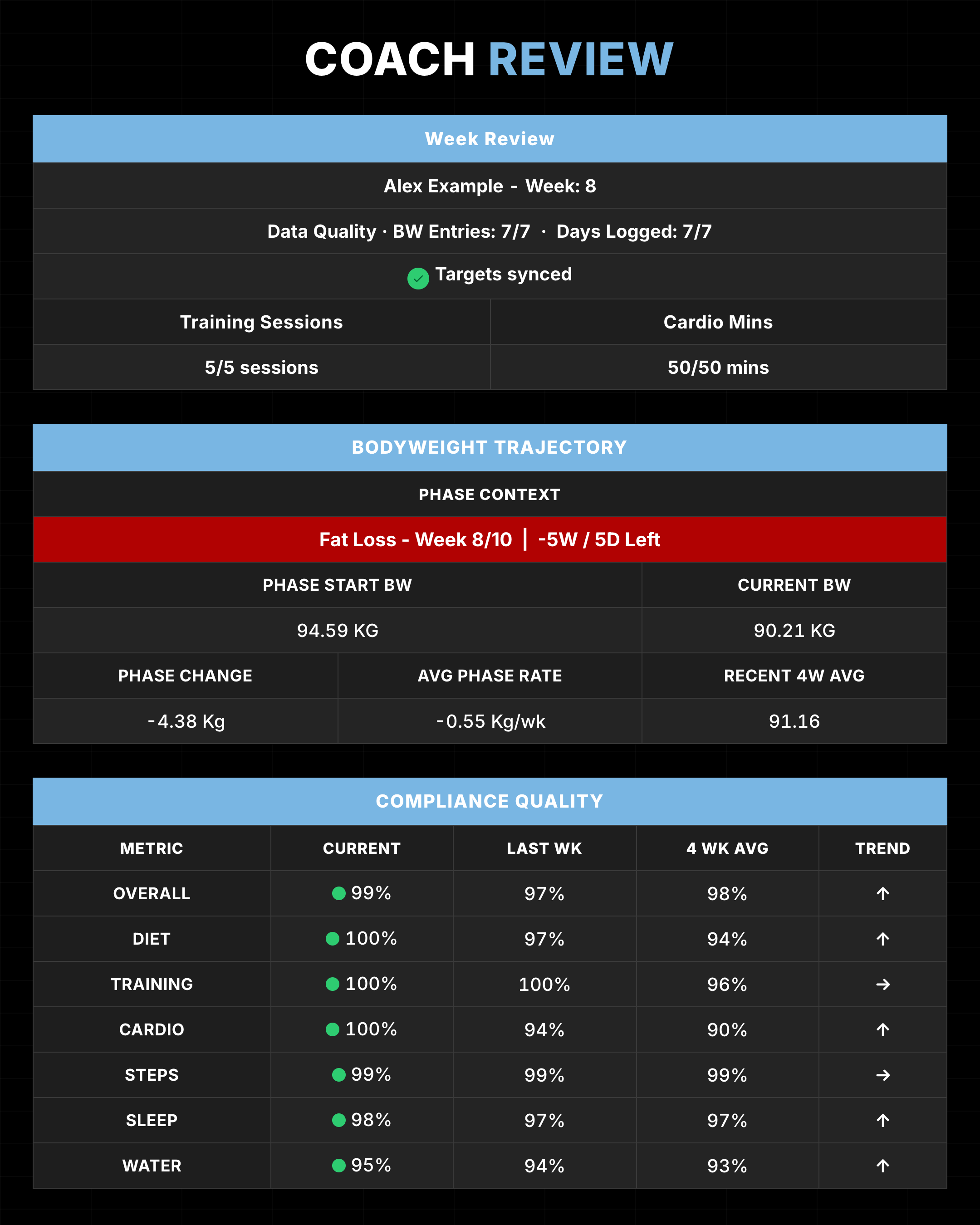
Coach Review· Example data
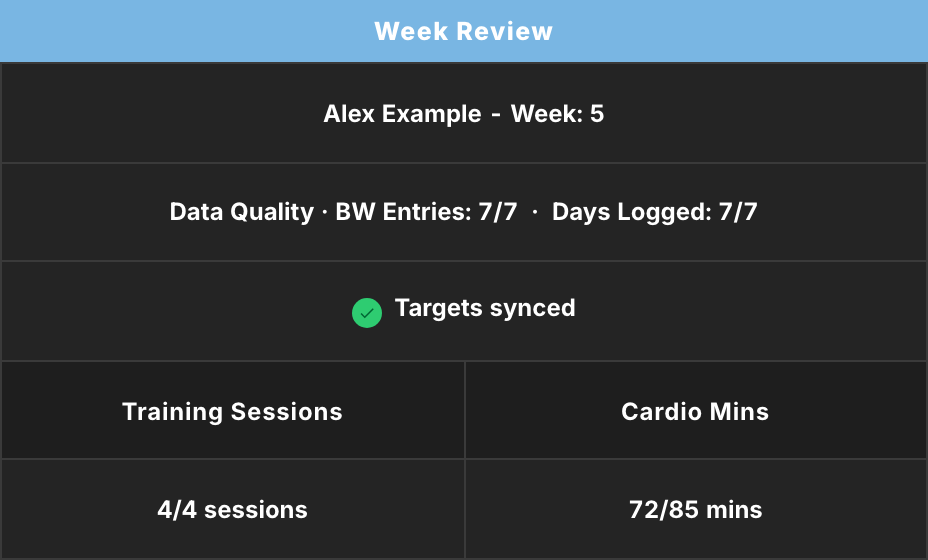
Coach Review for Alex Example showing the weekly review, data quality and locked target status
01

THE WEEK IN ONE COACH VIEW.

THE WEEK GETS MESSY BEFORE THE COACHING DOES.

If review day starts with rebuilding the week, the coaching has not started yet.

01

Chat week

The week lives in chat. Numbers, photos, "I was good this week" sit in message threads.Numbers, photos and "I was good this week" live in chat.

SYSTEM RESPONSE

Clients log the week in a structured Check-In instead of scattered chat.Clients log the week in one structured Check-In.
02

Tab hunt

Review day is a tab hunt. Protocol, weight, compliance, notes, each in a different place.Review day becomes a tab hunt for protocol, weight, compliance and notes.

SYSTEM RESPONSE

Coach Review puts the key weekly signals on one page so you hop fewer tabs.Coach Review puts the key weekly signals on one page.

03

Moving stick

The measuring stick moves. You change next week and last week's scores quietly shift.Change next week and last week's scores can quietly shift.

SYSTEM RESPONSE

Once this week's targets are locked, Week Planner edits do not change what past days were measured against.Past days stay measured against the targets that were locked.

04

Gym-app fatigue

Tools built for gyms, billed like software. Another app, another subscription, still not this job.Another gym app, another subscription, still not this job.

SYSTEM RESPONSE

A coaching system in your Drive. One client, one workbook. £300 one-off, not a subscription.One client, one workbook in your Drive. £300 one-off.

COACH REVIEW

This week's signals sit on one page, so review day is not spent hopping tabs.

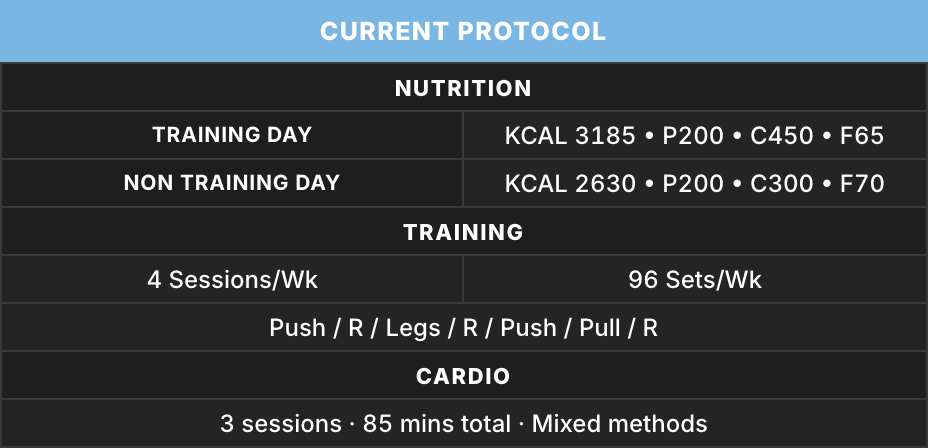
Coach Review · Protocol· Example data
Coach Review current nutrition, training and cardio protocol for Alex Example
Keep the current protocol beside the review.
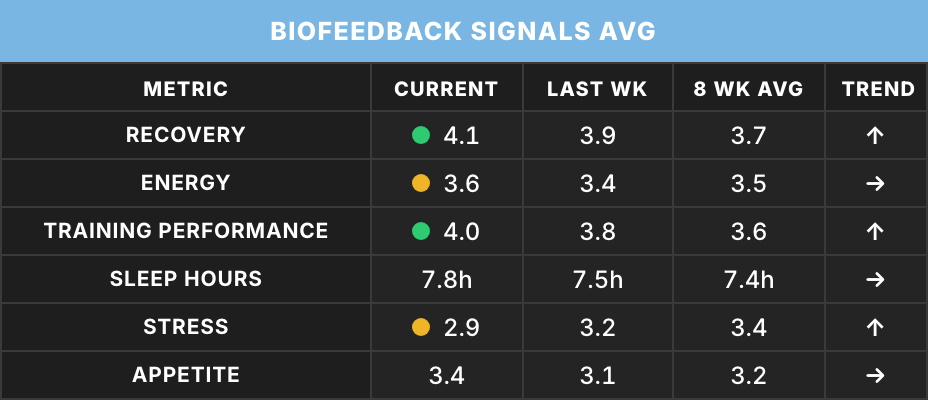
Coach Review · Biofeedback· Example data
Coach Review biofeedback signals for Alex Example showing recovery, energy, training performance, sleep, stress and appetite
Read the recovery signals behind the numbers.
Coach Review · Daily Detail· Example data
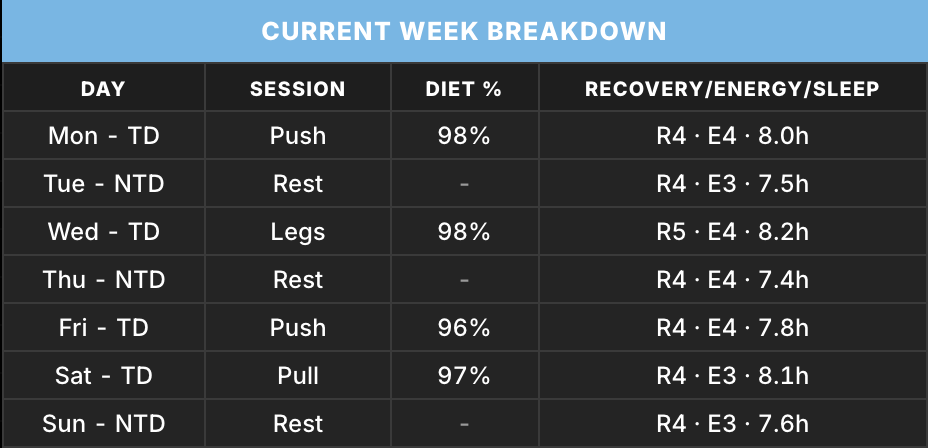
Coach Review day-by-day breakdown for Alex Example
See the daily detail behind the weekly signal.

THE WEEK RUNS ON ONE LOOP.

A structured Check-In, one-page Coach Review, and locked Week Planner targets give the week a clear rhythm.

01

Check-In

The client logs the week in a structured Check-In instead of scattering numbers through chat.

02

Review

Coach Review puts the key weekly signals on one page so you can read the week and make the call.

03

Plan

Set the next week in Week Planner without moving what past days were measured against.

04

Weekly Update

The last step in the loop. Then the same rhythm starts again.

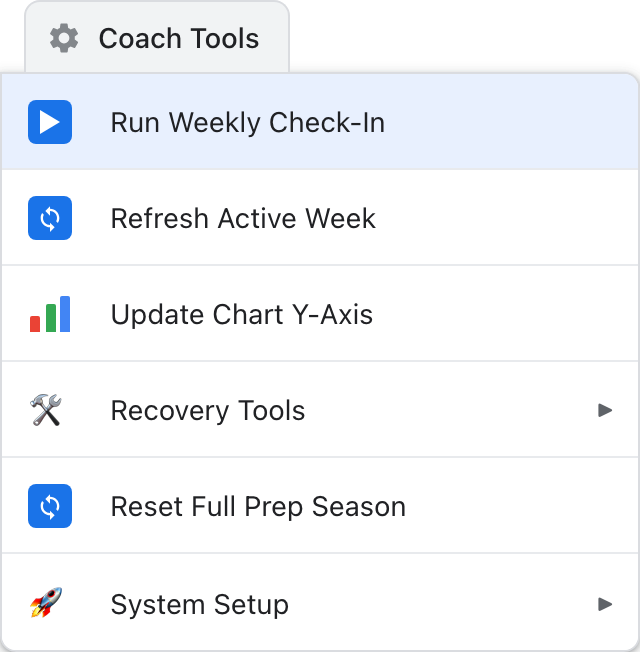
Coach Tools menu with Run Weekly Check-In emphasised and Recovery Tools and System Setup submenus

WEEKLY PATH

RUN WEEKLY CHECK-IN

The weekly path sits in one menu. Once this week's targets are locked, later Week Planner edits do not change what past days were measured against.

REFRESH ACTIVE WEEK

Apply a deliberate plan change to today and future days. Past days keep the targets they were measured against.

SEASON CONTROL

RESET FULL PREP SEASON

When this season is finished and you are ready for the next one. It clears the prep surfaces so the next season starts ready to go, and it asks you to confirm first. A blank sheet does not do that for you.

WEEKLY PATHRUN WEEKLY CHECK-INRefresh Active Week details inside

The weekly path sits in one menu. Once this week's targets are locked, later Week Planner edits do not change what past days were measured against.

REFRESH ACTIVE WEEK

Apply a deliberate plan change to today and future days. Past days keep the targets they were measured against.

SEASON CONTROLRESET FULL PREP SEASONFor the break between seasons

RESET FULL PREP SEASON

When this season is finished and you are ready for the next one. It clears the prep surfaces so the next season starts ready to go, and it asks you to confirm first. A blank sheet does not do that for you.

READ THE WEEK WITHOUT THE TAB HUNT.

Coach Review puts the key weekly review signals on one page so you hop through fewer tabs. The coaching decision stays yours.

PLAN AHEAD WITHOUT MOVING THE MEASURING STICK.

Once this week's targets are locked, Week Planner edits do not change what past days were measured against.

01

Plan

Set the next week in Week Planner.

02

Lock

Lock the targets used for this week.

03

Measure

Past days keep the targets they were measured against.

Week Planner· Example data
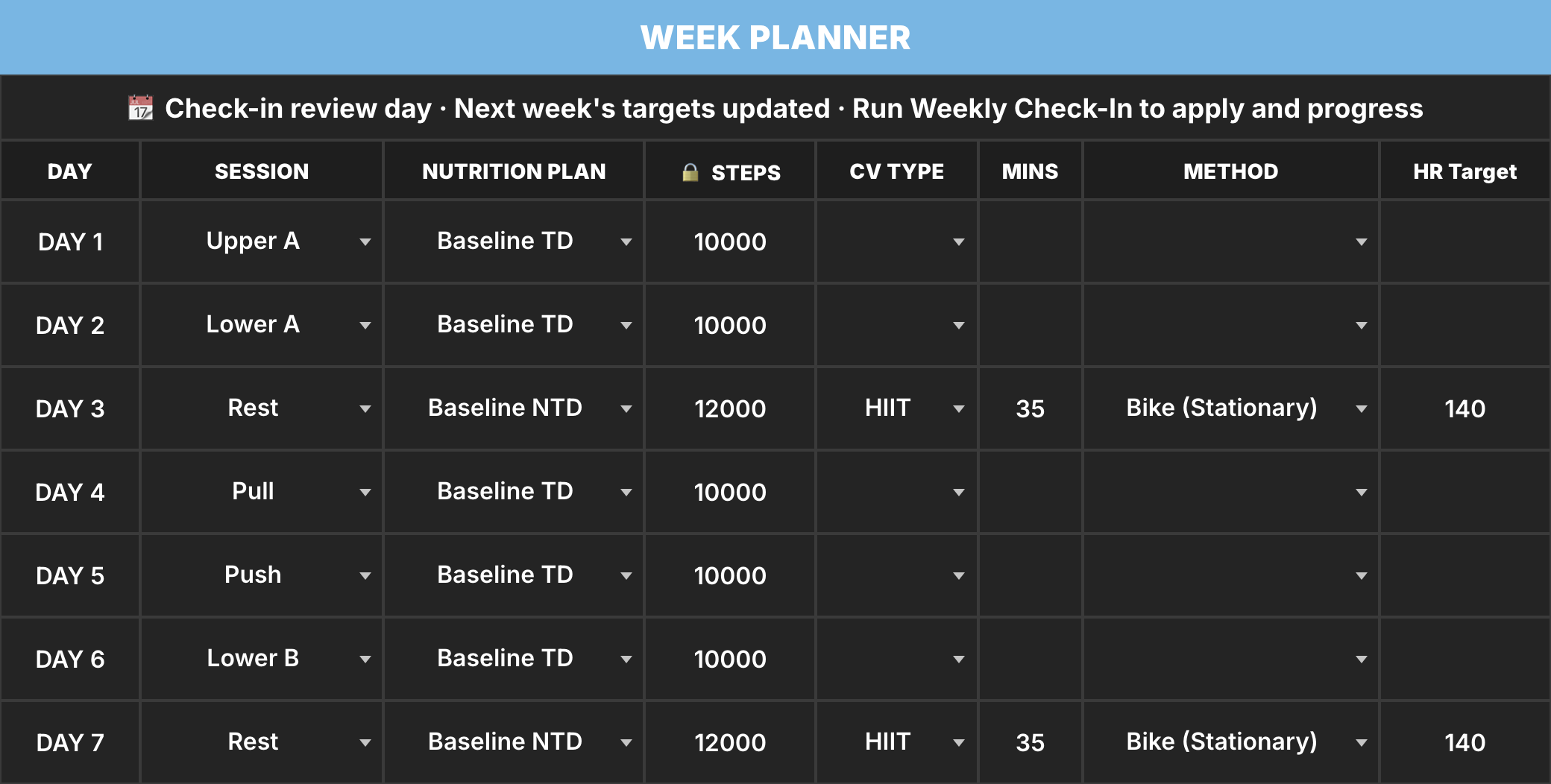
Week Planner for Alex Example
Plan the coming week in Week Planner.
Week Planner· Example data
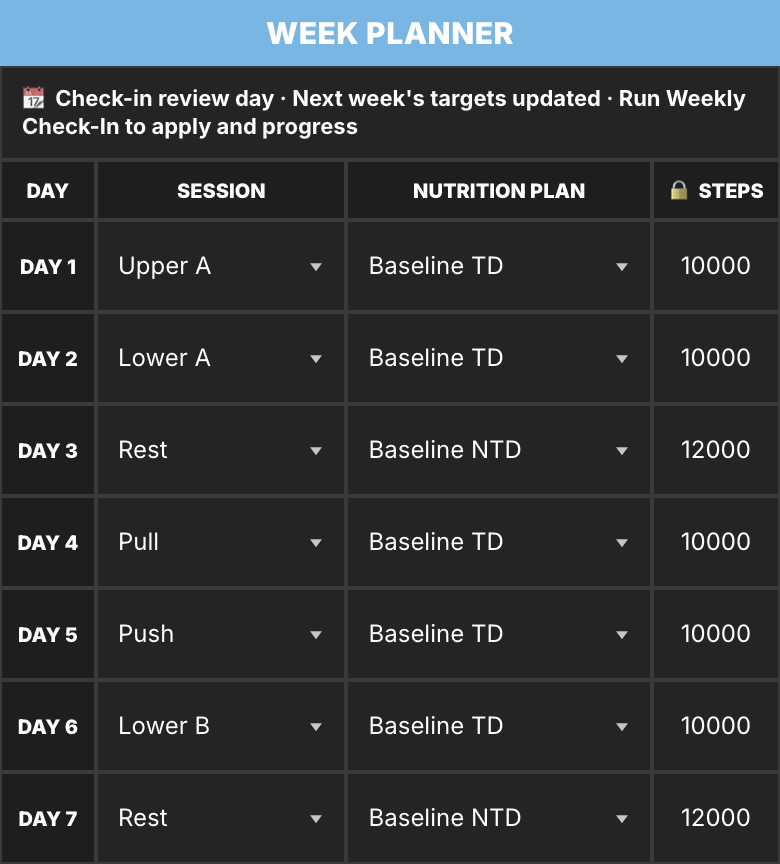
Mobile Week Planner view for Alex Example
Set the coming week in Week Planner.

ONE CLIENT TAB. TODAY'S PLAN. THE LIVE WEEK.

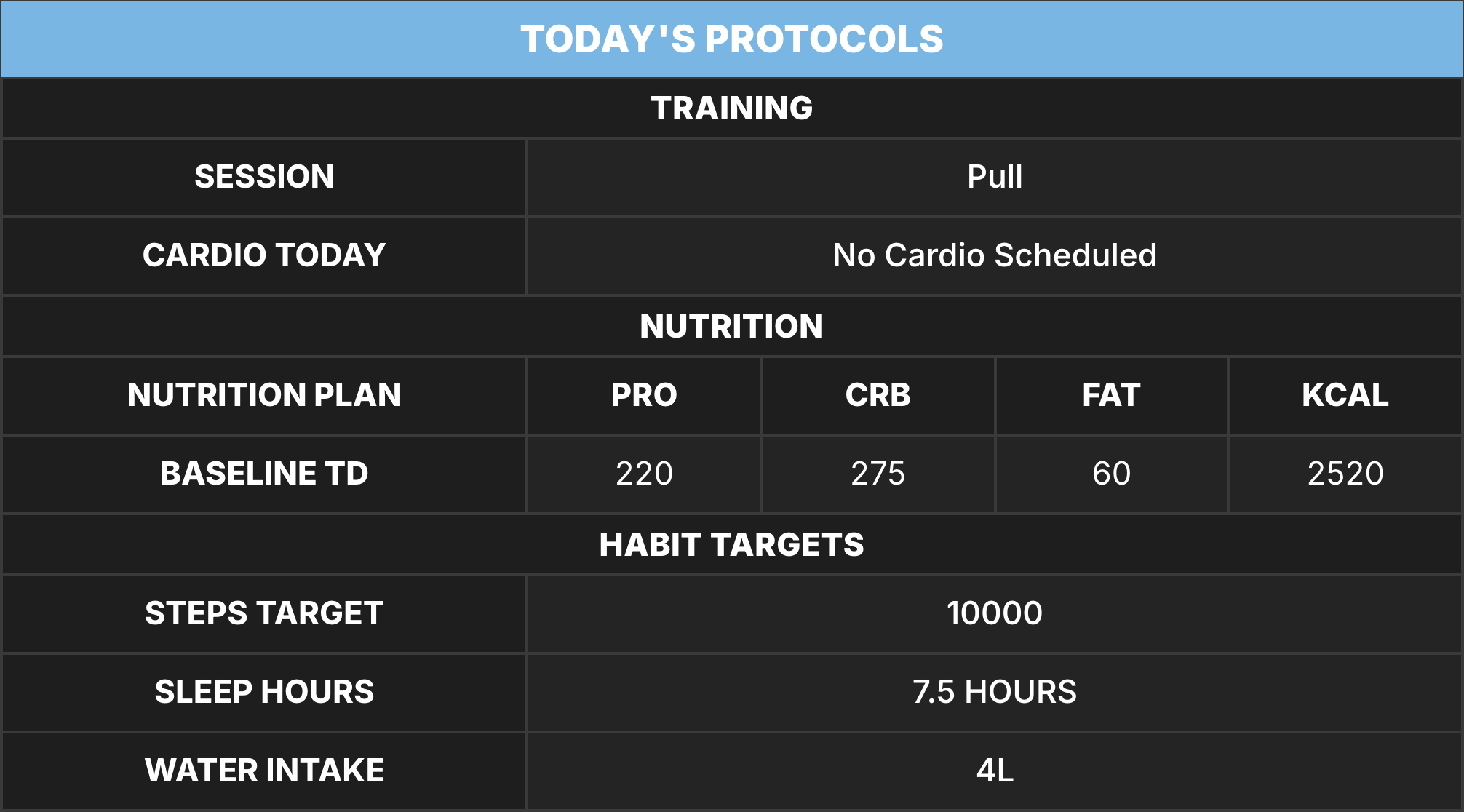
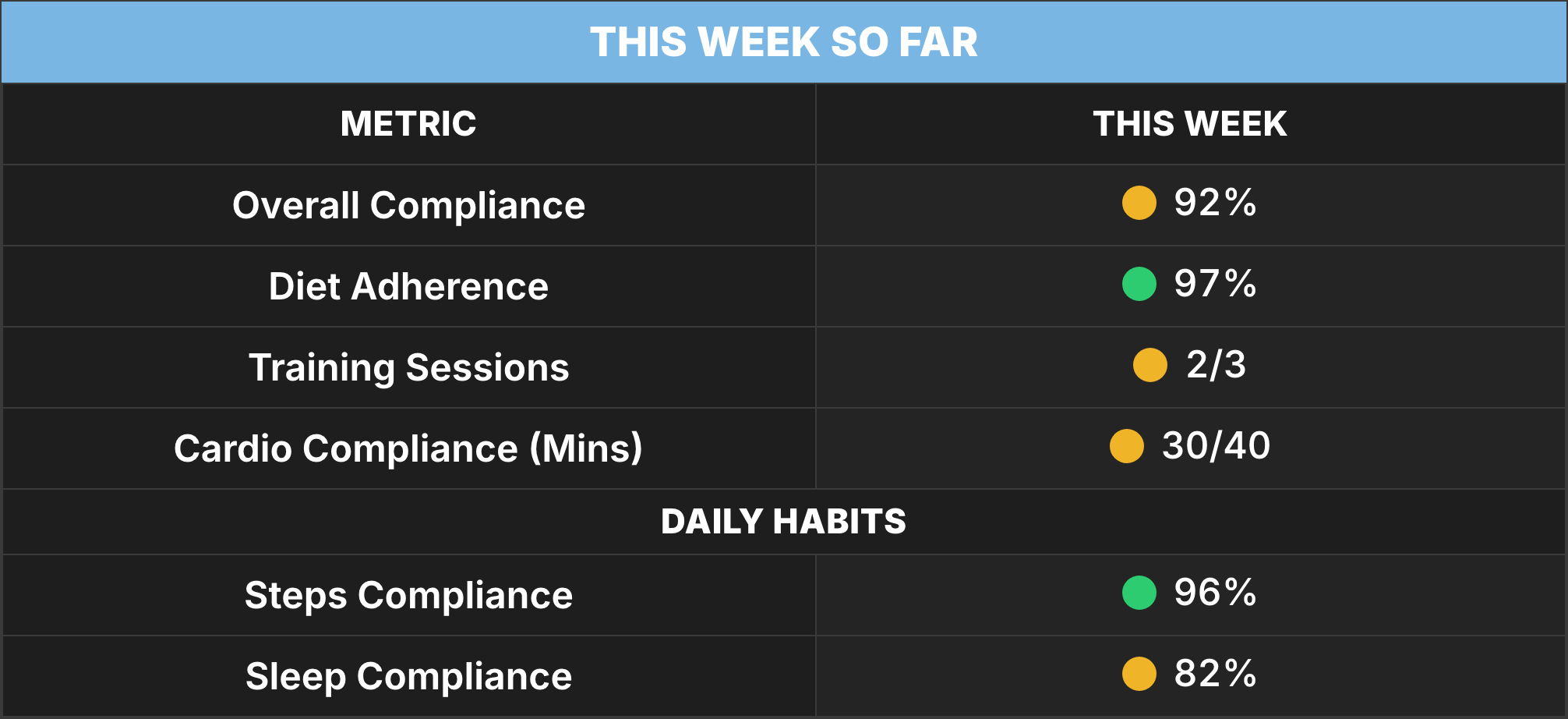
Client Profile is the view your client opens: today's plan and this week's live compliance on one tab. Check-In is where they log the week. Coach Review stays the page you read the week from.

Client Profile · Dashboard· Example data
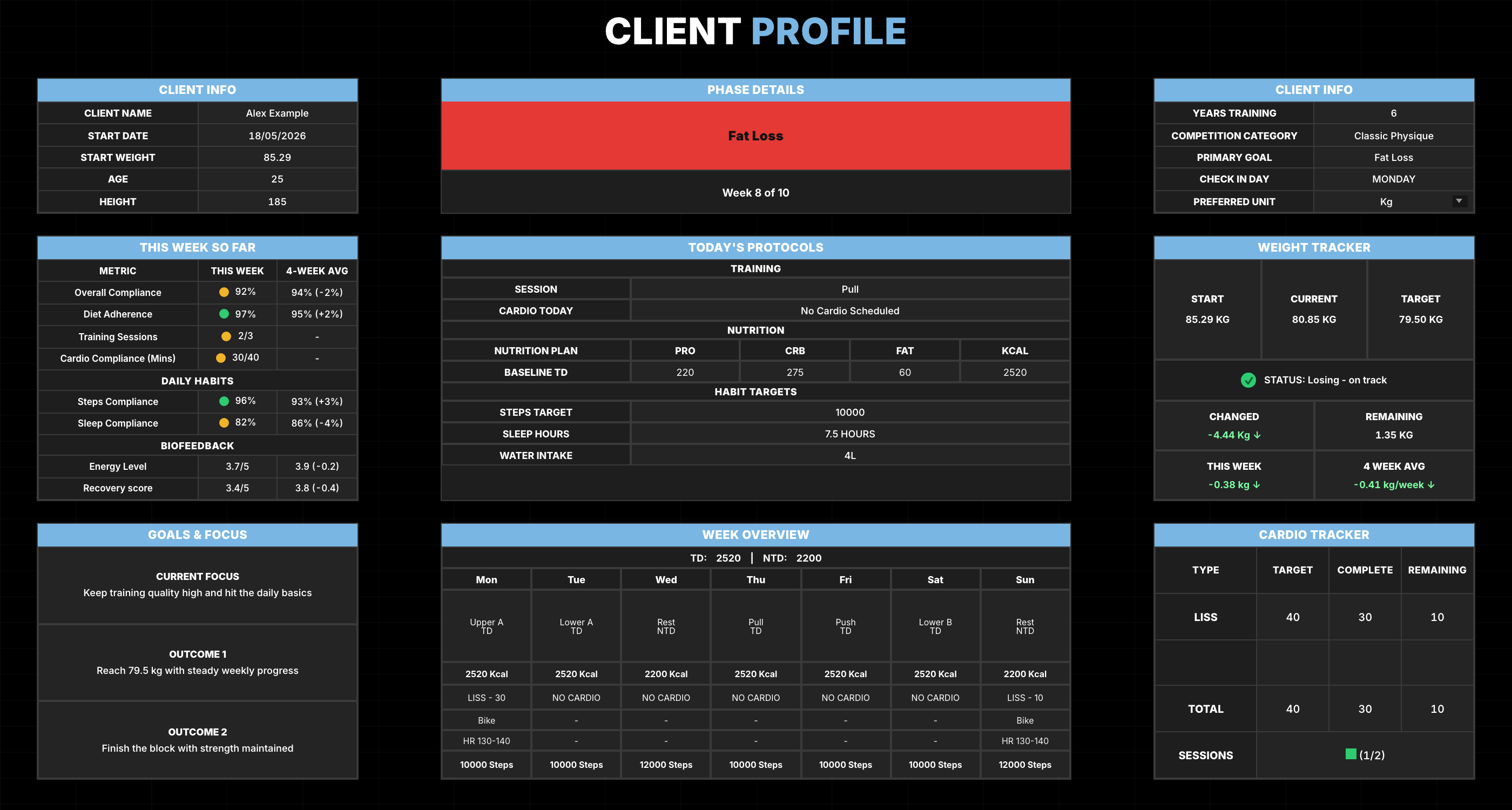
Client Profile dashboard for Alex Example showing client information, today's Pull session and Baseline TD targets, live weekly compliance, weight, goals, Week Overview and cardio progress
One Client Profile tab: today's plan and the live week in view.
TODAY

Session, day type, and today's targets.

THIS WEEK

Live compliance stays in view on the same Client Profile tab.

Client Profile · Today· Example data
Client Profile today's protocols for Alex Example
Today. Session, day type, and today's targets.
Client Profile · This week so far· Example data
Client Profile live weekly compliance for Alex Example
This week so far. Live compliance on the habits you actually score.

THREE DOORS

CHOOSE HOW YOU WANT TO RUN THE WEEK.

An app, a blank file, or a coaching system in your Drive. CoachSheetsHQ is the system: one client, one workbook, with the weekly loop already shaped.

Buy

FOR COACHES WHO WANT THE WEEK ON A SYSTEM.

A STRONG FIT

  • Online and physique coaches
  • Coaches running a weekly review rhythm
  • Busy coaches who want fewer tabs on review day
  • Prep coaches planning phases week by week
  • Coaches who thought Sheets could not feel like a real system

NOT THE RIGHT FIT

  • Teams needing every client inside one app dashboard
  • Coaches wanting software to choose the next move
  • Gyms looking for class scheduling or a community app
PREP PLANNING

THE PHASE HAS A PLACE TOO.

Roadmap holds the week-by-week phase plan and logged outcomes. When prep is active, Client Profile shows the next show with weeks and days out. Peak Week Plan steps in on peak dates, and when you are ready, start the next season from the menu.

THE SYSTEM, SURFACE BY SURFACE.

Seven surfaces. One weekly rhythm. Each one does a specific job, from review day to nutrition day types to prep season tools.

01

Coach Review

One page for review day. Weight, compliance, biofeedback, protocol and notes, without hopping tabs.

View surface details
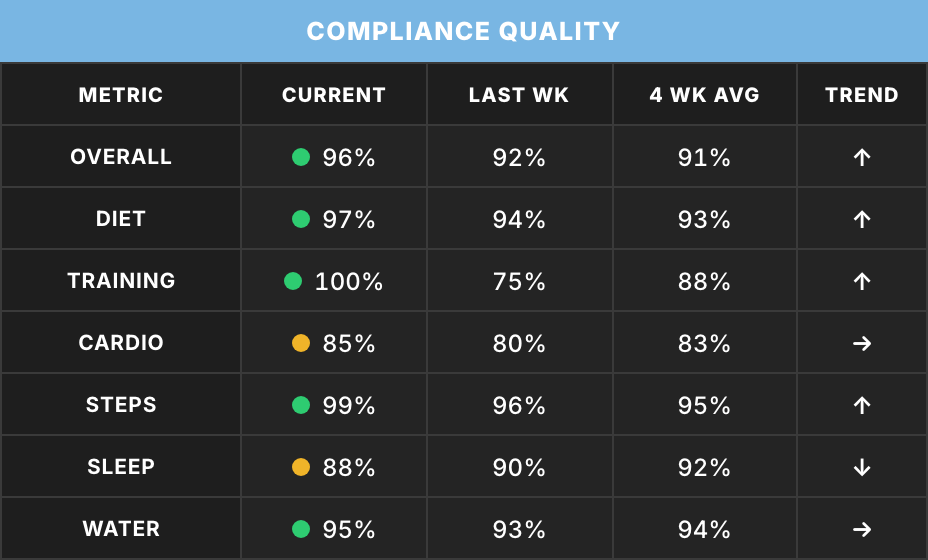
  • Week Review table with data quality, sessions and cardio
  • Compliance Quality and Biofeedback Signals on the same page
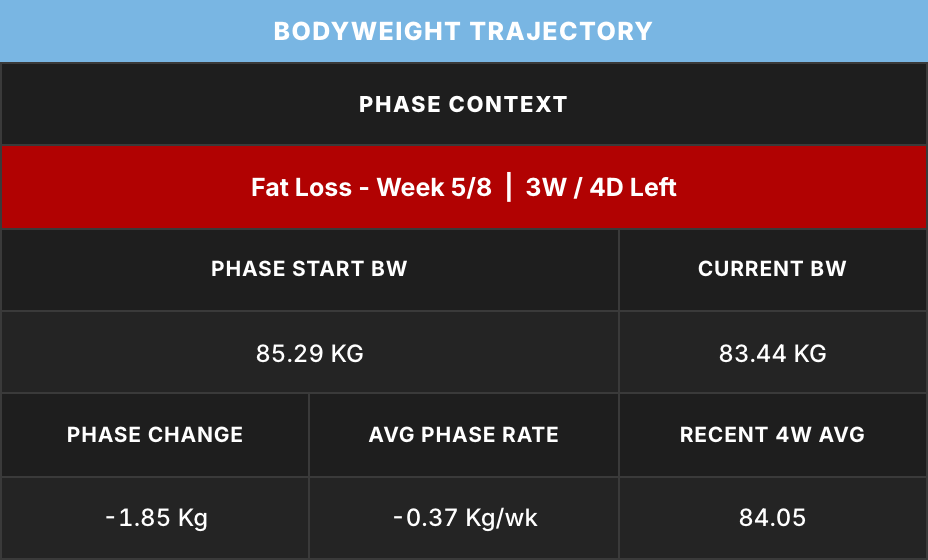
  • Current Week Breakdown, bodyweight trajectory, and check-in and coach notes
02

Client Profile

Today's plan and this week's live compliance on one tab.

View surface details
  • Today's Protocols: the session, day type and targets set for today
  • This Week So Far as the week builds
  • Week Overview and goals on the same tab
03

Structured Check-In

Clients log the week in one sheet instead of scattering numbers through chat.

View surface details
  • Day 1 to 7 columns with dates
  • The daily logging rows clients and coaches use
  • Week averages where they are shown
04

Nutrition Plan

Targets by day type: flexible nutrition targets or a built meal plan.

View surface details
  • Training Day, Non Training Day, Refeed / High, Deload / Low (prep variants when you need them)
  • Flexible target or Meal Plan approach per client
  • Meal plans pull foods from your Food Database; kcal follows the targets
05

Training Plan

Named sessions that stay consistent from plan to check-in.

View surface details
  • Named sessions stay consistent from plan to Check-In
  • Exercise rows with sets, reps, and cues
06

Week Planner + Locked Targets

Set the week, then measure against what was actually set.

View surface details
  • Edit next week without moving this week's measuring stick
  • Refresh Active Week updates remaining days without rewriting past ones
07

Roadmap Tracker + Prep System

Phase plan with logged week outcomes. Prep tools get their own band below.

View surface details
  • Phase and nutrition strategy, week by week
  • Logged weight, cardio, steps, and nutrition targets from completed weeks
  • Prep countdown, Peak Week Plan that can override normal week targets, start a new season when this one is done

PREP GETS THE SAME STRUCTURED WEEK.

Set your shows, build your Peak Week Plan, and the season is written down week by week. The coaching decisions stay yours.

01

Show-relative countdown

Set your show dates and the countdown follows. Client Profile shows the next show with weeks and days out when prep is active.

02

Peak Week Plan override

Build the 7-day Peak Week Plan once. On peak days those targets step in for the normal week targets, and the rest of the week stays untouched.

03

Prep Roadmap history

Prep Roadmap holds the season day by day. Each weekly update writes the completed week in, so the season stays readable after the show.

04

Start the next season

After the last show, Active Prep ends on its own and this season stays there to look back on. When you want the next season, start it from the menu. It clears the prep surfaces, asks you to confirm, and leaves you ready to go again.

DAY TYPES

Prep adds its own day types: Refeed/High #2 and #3, and Deload/Low #2 and #3 sit beside the baseline set.

BUILT FOR COACHES, FOR THE WEEK YOU ALREADY RUN.

Files in your Drive. The weekly loop already shaped. Your coaching judgement stays at the centre.

A NOTE FROM THE FOUNDER

Your judgement stays at the centre. The system gives the week a clear shape.

Theo FontaineFounder, CoachSheetsHQ

YOUR FILES. YOUR DRIVE.ONE CLIENT, ONE WORKBOOK.THE WEEKLY WORKFLOW, ALREADY SHAPED.

THE STRAIGHT ANSWERS.

Product shape, ownership and the offer.

PUT THE WEEK ON A SYSTEM, NOT A BLANK FILE.

A clear weekly loop. Files in your Drive. Your coaching judgement stays at the centre.

PRICE£300

One-off. Not a subscription.

Buy

Buy opens Instagram. I send the terms, then Stripe after written acceptance.

HOW BUYING WORKS

  • Buy opens a conversation on Instagram. It takes no payment.
  • I send the business terms. You accept them in writing.
  • Then I send the Stripe Payment Link. £300, one-off.
  • What is supplied is set out in those terms.
  • One client, one workbook. You make a copy for each client.
Read the Terms summary